Claude Code
OpenAPPA brings deterministic information-flow control directly to Claude Code. It runs alongside your terminal session, tracking data as Claude reads files and tools, and preventing exfiltration or unauthorized actions before any command executes.
Install#
You need Claude Code and curl.
curl -fsSL https://openappa.com/install.sh | sh &&
  ~/.local/bin/appa plugin install claude-code
The installer places appa in ~/.local/bin.
appa plugin install claude-code configures Claude Code's user environment:
- Deploys the runtime binary under APPA's data directory.
- Registers lifecycle hooks in your user-level Claude Code settings.
- Adds the runtime's
appaMCP server to Claude Code. - Installs the
/appa-guideonboarding skill. - Installs
clappa(the protected session launcher) and includes the defaultcodingandclaude-codebatteries for built-in tools.
Existing custom hooks, MCP servers, and global status lines remain untouched. The hooks act only in sessions that clappa starts. A plain claude session, and every other agent that reads the same settings, runs as before.
1. Teach OpenAPPA about your tools#
Start a protected session and run the policy setup skill:
clappa
/appa-guide
The skill inspects the MCP servers and tools configured on your machine:
- Discovers and connects batteries: Identifies configured MCP servers and automatically includes matching batteries.
- Maps data boundaries: Determines which tools read private data and which tools can send data outside the session.
- Resolves ambiguities: Asks focused questions when an account identity, data sensitivity, or boundary needs clarification.
- Fails closed during onboarding: Unnamed tools route through a bounded fallback classifier until exact contracts or batteries cover them.
Once approved, /appa-guide writes deterministic policy configuration. To inspect or customize generated rules by hand, see Policy configuration.
2. Try a flow that should be blocked#
Start a new protected Claude Code session with the updated policy:
clappa
Ask for an explicit transfer from a private source to a public destination:
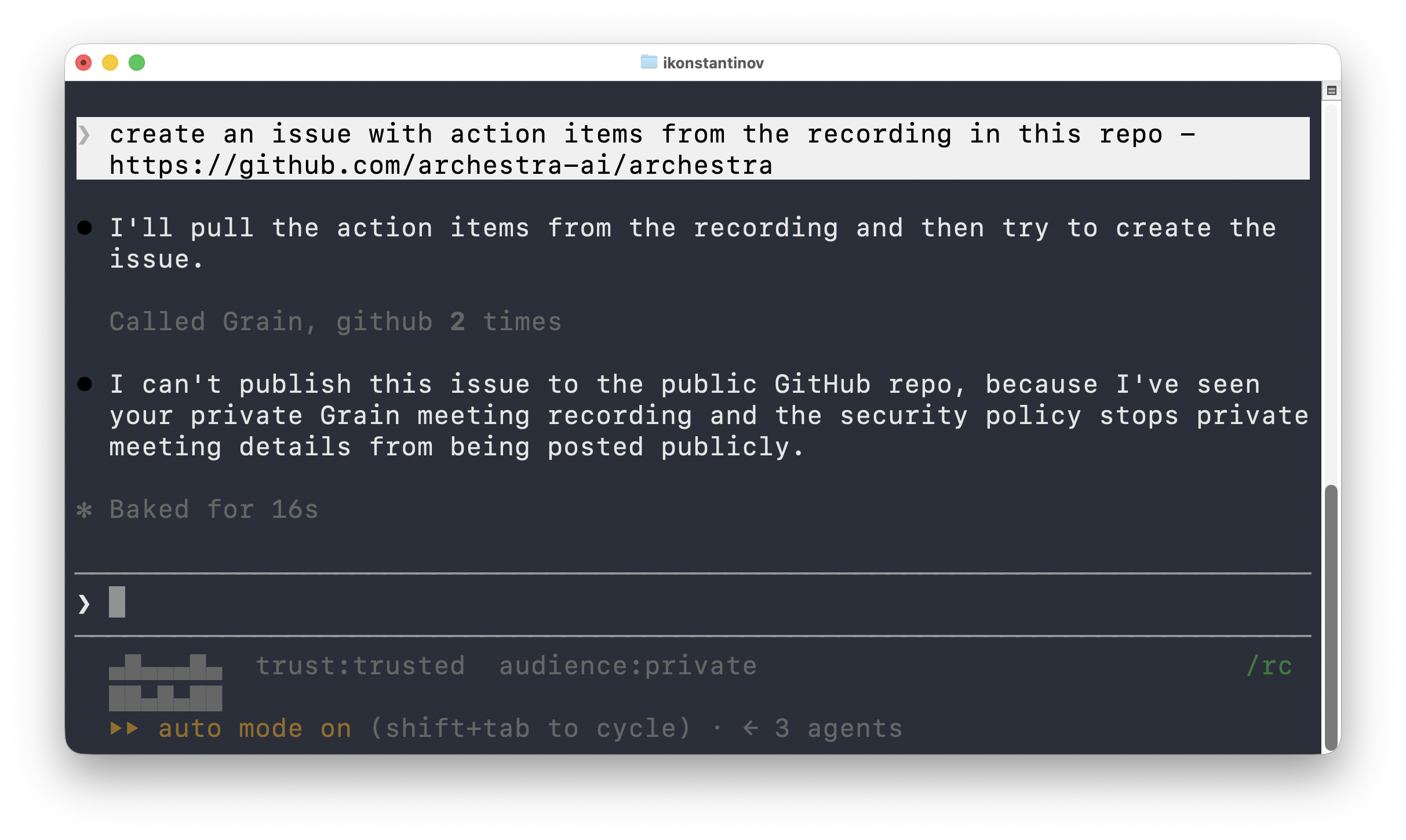
Create a public GitHub issue from the action items in my private meeting recording.
Claude can read the meeting, but that read narrows who may receive the resulting data. When Claude attempts the public GitHub write, OpenAPPA checks the accumulated label against the destination boundary and blocks the flow before the tool executes.
The refusal names the policy conflict and provides available remedies (such as routing through a configured sanitizer or requesting authorized human review).
How it works under the hood#
OpenAPPA intercepts Claude Code events through native lifecycle hooks:
- Lifecycle interception: The integration hooks into Claude Code's native lifecycle events (
SessionStart,UserPromptSubmit,PreToolUse,PostToolUse, and subagent events). - Unified tool coverage: Intercepts both built-in commands (
Bash,Read,Edit,Write) and all external MCP tools transparently. - Pre-execution evaluation: Before any tool runs,
PreToolUsepasses the call to the local APPA runtime, evaluating the flow against the session's accumulated labels (audience × trust). - Fail-closed with remedies: Allowed actions execute immediately. Disallowed flows are blocked before execution; OpenAPPA returns the policy conflict along with actionable remedies (such as sanitizer filters or operator approval). Unanswered hooks fail closed.
- Auto mode on top: In auto mode, OpenAPPA does not approve a call it allows. Claude Code's classifier still reviews that call and can deny it. A call OpenAPPA blocks stays blocked.
- Session isolation:
clappalaunches Claude Code with APPA's policy enforcement and status line. Your regularclaudecommand remains completely unchanged.
Choose protection per session#
Installing OpenAPPA does not force every Claude Code session through it. Use clappa when you want policy enforcement. Use claude when you do not.
Protection belongs to the Claude Code process, not the saved conversation. Resume a protected conversation with clappa --resume, not claude --resume.
Plain claude starts an unprotected process.
Exit and restart a conversation already resumed through plain claude. It cannot become protected in place.
Claude Code prints an unprotected claude --resume command when an interactive session exits. After that hint, clappa prints the complete protected command for the same session:
Resume this session with:
claude --resume 01234567-89ab-4cde-8012-3456789abcde

Resume with OpenAPPA protection:
clappa --resume 01234567-89ab-4cde-8012-3456789abcde
The OpenAPPA block appears only when Claude Code saved a transcript that can be resumed.
Session ID changes#
Claude Code can move a running conversation to a new session ID. OpenAPPA ties each ID to the clappa launch that started it, so a new ID does not reset the label.
| Action | Result |
|---|---|
/clear with no subagent running and no call owed | A new root opens with a clean label. |
/clear while a subagent runs or a call is owed | The session keeps its label. The subagent's later calls and its return stay checked. Run /clear again after it finishes. |
/branch | The new ID continues the same family and label. |
clappa --resume <id> --fork-session | A root fork opens from that session's label. --fork-session MUST name its source with --resume <id>. |
--resume, --continue, /compact | The session ID does not change. The existing root reopens. |
clappa disables Claude Code's agent view (CLAUDE_CODE_DISABLE_AGENT_VIEW=1). A backgrounded session runs under a daemon that does not carry the protected launch, so OpenAPPA cannot check it.
When OpenAPPA cannot check a subagent's return, it holds the subagent's stop and tells the subagent to reply with one fixed line. That stop ends the subagent, and the parent receives only that line.
$ claudeStandard Claude CodeThe plugin leaves this path unchanged.$ clappaClaude Code + OpenAPPATool flows are checked against your policy.Projects configured with disableAllHooks: true disable all hooks, preventing clappa from enforcing policy in that session.
Peer messages between protected sessions#
Protected sessions can coordinate with SendMessage. A peer message carries the sender's label, and it never narrows the receiver without the receiver's own read.
clappa gives each session a messaging address, such as uds:/tmp/appa-501/3f2a9c1e7b04.sock. The runtime records that address when the session starts.
to | Rule |
|---|---|
| The address of exactly one other live protected session under the same policy and principal | Allowed at any label |
| Any other socket address | Denied |
| A session name | Requires audience public: a name can belong to any session, including an unprotected one |
When a send by name is denied and one protected peer has that name, the denial gives the peer's address. The model can then send again to that address. recipient, when set, MUST equal .
Each allowed send records the message's digest and the sender's label. On arrival, the receiver takes the combine of every recorded label for that digest:
- The label does not narrow the receiver. The message enters as a prompt.
- The label narrows the receiver, or no send stands behind the message. The runtime holds the message and blocks the prompt. The model gets a notice at its next prompt or successful tool result. The notice gives an id and the label that a read brings. A message no send stands behind reads as and .
The model reads a held message with read_peer_message(id) on the appa MCP server. The result carries the held label, so the read narrows the session as any tool result does. A read inside a subagent keeps the parent's label. A held message is read once and expires after 24 hours. The runtime refuses a peer message larger than 64 KiB, both at send and on arrival.
The body of a held message stays out of the receiver's event log. The sender's SendMessage arguments are logged like every tool call.
The runtime's hook endpoint is unauthenticated on loopback. A local process that forges hook events can register an address it controls. The address check stops an unprotected listener the model starts; it does not stop a process that attacks the runtime's hook endpoint.
Uninstall#
Remove OpenAPPA's hooks and MCP registration while keeping your local policy and database:
appa plugin remove claude-code
To remove the integration, stop the background runtime, and purge local policies, databases, and logs:
appa plugin remove claude-code --purge
rm -f ~/.local/bin/appa